Should You Let AI Bots Crawl Your Site? How to Decide (and How to Check Who's Visiting)
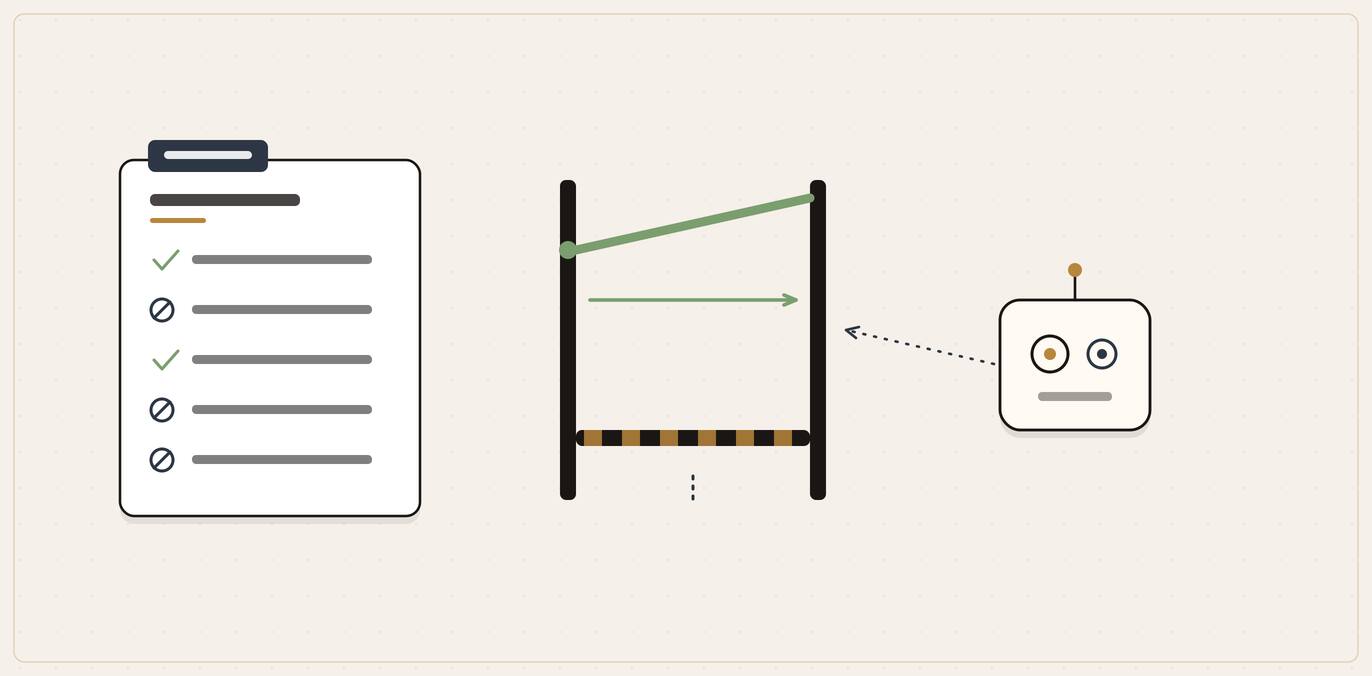
There is a quiet argument happening on the open web, and your business website has been pulled into it without anyone asking you.
On one side, a growing list of publishers and platforms want to block the bots that AI companies send out to read websites, or charge them for the privilege. On the other, those same AI bots are now how a large share of your customers find and choose a local business. So when your web developer asks "should we block the AI crawlers?", or you read a headline telling you to lock them out, the straight answer is not a simple yes or no. It depends on what you are trying to achieve.
The short answer, for most local businesses, is the opposite of the headlines. But you should understand why before you act, so let us walk through it.
The short version, in case you only read this far
- AI "crawlers" are not all the same. Some exist to put your business into AI answers and search results. Others exist to feed model training. Blocking the first kind makes you invisible to AI search. Blocking the second kind costs you almost nothing visible. Telling them apart is the whole game.
- Most local businesses want to be found, so they should allow the search and answer crawlers. If you sell to people in your town and you want ChatGPT, Perplexity and Google to recommend you, blocking the bots that surface your site is an own goal.
- The "block everything" movement is aimed at big publishers, not at you. Newspapers and stock-photo libraries lose money when AI reads their paid content and gives it away free. A local accountant or electrician has the opposite problem: being read too little, not too much.
- You can split the decision. It is entirely possible to welcome the crawlers that get you cited while refusing the ones that only train models. The settings to do that are below.
- You can see who is visiting. Your server logs or analytics already record the bots. We show you what to look for.
Quick decision table: which bot types should a normal local business allow?
| Bot type | Default for a local business | Why |
|---|---|---|
| Search and answer crawlers | Allow | They are the bots that get your site surfaced in AI search answers. |
| Training crawlers | Optional | Blocking them usually does not remove your visibility from search-style AI answers. |
| User-triggered fetchers | Assume access | If a real user points an AI tool at your page, robots.txt may not stop that fetch. |
| Private areas | Protect properly | Use authentication, not robots.txt alone, for anything confidential. |
Who is actually knocking: the AI bots hitting your site
When people say "AI crawlers", they lump together three different jobs. Getting the decision right starts with separating them, because the consequences of blocking each one are completely different.
Three bot families, three different decisions
Search and answer crawlers
These are the bots that help your site appear inside AI answers and search-style results.
- OAI-SearchBot
- PerplexityBot
- Googlebot for normal Search visibility
Training crawlers
These gather content that may be used to improve foundation models, not to put you in tomorrow's answer.
- GPTBot
- Google-Extended
User-triggered fetchers
These act because a real person asked the AI tool to look at a specific page.
- ChatGPT-User
- Other user-initiated fetches
Search and answer crawlers (the ones that get you recommended)
These bots exist so that AI tools can surface real websites in their answers and search features. They are the modern equivalent of Googlebot: if you want to appear, you need to let them in.
The clearest example is OpenAI's OAI-SearchBot. In OpenAI's own crawler documentation, it is described as the bot "used to surface websites in search results in ChatGPT's search features." The documentation is blunt about the cost of blocking it: "Sites that are opted out of OAI-SearchBot will not be shown in ChatGPT search answers" (OpenAI, Overview of OpenAI Crawlers)[1]. OpenAI explicitly recommends allowing it: "we recommend allowing OAI-SearchBot in your site's robots.txt file."
Perplexity runs the equivalent. Its PerplexityBot "is designed to surface and link websites in search results on Perplexity. It is not used to crawl content for AI foundation models", and Perplexity likewise recommends allowing it so your site can appear (Perplexity, Crawler documentation)[2].
The point to hold onto: blocking a search crawler does not protect you from anything. It just deletes you from that engine's answers.
Training crawlers (the ones that feed the models)
These bots collect content that may be used to train the underlying AI models. They are not what decides whether your business gets named in a live answer today.
OpenAI's GPTBot is the example here. Its documentation says it "is used to crawl content that may be used in training our generative AI foundation models. Disallowing GPTBot indicates a site's content should not be used in training" (OpenAI)[1]. Google runs a separate control for the same purpose: Google-Extended, which a site can use to "manage whether their sites help improve" Google's generative AI models, including the models behind Gemini (Google, An update on web publisher controls)[3]. Crucially, Google-Extended is independent of normal Search: blocking it does not remove you from Google's results or AI Overviews, it only opts you out of training.
Blocking the training crawlers is a values and rights decision (do you want your words used to train commercial models?), not a visibility decision. For most local businesses it changes nothing a customer would ever notice.
User-triggered fetchers (the ones you cannot really block)
There is a third category that owners often misunderstand. When a person actually asks an AI tool to look at a specific page, the tool sends a fetcher to read it then and there. OpenAI's ChatGPT-User and Perplexity's Perplexity-User are these. Because the visit was requested by a real person, the rules are different: OpenAI notes that for ChatGPT-User, "because these actions are initiated by a user, robots.txt rules may not apply" (OpenAI)[1].
In practice this means you cannot reliably stop an AI tool from reading a page when a human points it there. That is usually fine: a person who has asked an AI to look at your page is a prospect, not a threat.
The independence of these settings is the part that makes a sensible decision possible. As OpenAI puts it, "each setting is independent of the others", so "a webmaster can allow OAI-SearchBot in order to appear in search results while disallowing GPTBot" (OpenAI)[1]. You are not forced into all-or-nothing.
Tell them apart
Three bot families, three different decisions
| Bot family | Default for a local business | Cost of blocking it |
|---|---|---|
| Search and answer crawlers (OAI-SearchBot, PerplexityBot) | Allow Get found | Deleted from that engine's answers; protects nothing |
| Training crawlers (GPTBot, Google-Extended) | Optional | Changes nothing a customer would notice; a values choice |
| User-triggered fetchers (ChatGPT-User) | Assume access | Cannot be reliably blocked; the visit was a person's request |
What this decision means for a local business
For a national publisher, AI crawling is a revenue question. For a local business, it is a discovery question, and the stakes run the other way.
People increasingly choose local businesses through AI. In BrightLocal's Local Consumer Review Survey 2026, the share of consumers using AI tools such as ChatGPT for local business recommendations jumped from 6% the year before to 45%, making AI the third most popular way to find a local business; four in ten (40%) said they trust AI tools to recommend businesses (BrightLocal, Local Consumer Review Survey 2026)[6]. When someone asks "who is a good roofer in Sheffield?" or "recommend a family solicitor near me", the answer is assembled from sites the AI was allowed to read.
If your site is blocking the crawlers that build those answers, you have opted out of the recommendation before it was even made. A roofer who blocks OAI-SearchBot is invisible in ChatGPT's search answers no matter how good their work or their reviews. The competitor down the road who left the door open gets named instead.
This is the asymmetry that the "block AI" headlines miss. A newspaper that blocks AI crawlers protects content it sells. A local business that blocks them protects nothing and loses the one thing it needs: to be findable at the moment a customer is choosing.
The block-everything trend, and why it is mostly not aimed at you
You may have seen the news that the infrastructure company Cloudflare, which sits in front of a large slice of the web, decided to change the default. On 1 July 2025, in a move it called "Content Independence Day", Cloudflare announced it was "changing the default to block AI crawlers unless they pay creators for their content" (Cloudflare, Content Independence Day)[5].
The reasoning is real, and worth understanding. Cloudflare's argument is that the old bargain of the web (let us copy your content, and we will send you traffic) has broken down for content creators. By its measure, getting traffic back from AI tools is far harder than it was from classic search: "with OpenAI, it's 750 times more difficult to get traffic than it was with the Google of old. With Anthropic, it's 30,000 times more difficult" (Cloudflare)[5].
Read that carefully and you will see who the complaint belongs to: businesses whose entire model is publishing content and earning from the traffic or subscriptions it brings. A media site loses badly when an AI reads its article and answers the reader's question without a click. That is a genuine grievance, and blocking or charging the crawlers is a rational response for them.
A local service business is in a different position. You do not earn from website traffic directly; you earn from the phone ringing and the enquiry form being filled in. For you, an AI that reads your site and tells a nearby customer "this firm covers your area, has strong reviews and offers exactly that service" is doing your marketing for free. The traffic loss that terrifies a publisher is, for you, a qualified recommendation you did not have to pay for.
So the trend is real, but the right response is not "block, because everyone else is". It is "decide based on your own model". For most local and small businesses, that points toward staying open to the crawlers that get you recommended.
The decision framework: allow, block, or split
Here is the practical way to choose. Pick the description that fits you.
Allow or block
Which side of the argument are you on?
Ask
Is your website itself the paid product?
Allow the search crawlers
A local business earns from the phone ringing, not page views; an AI reading your site is free marketing. Opt out of training only if you wish.
Restricting can make sense
A paywalled archive, stock library or original journalism loses when AI gives its paid content away; blocking or charging is rational there.
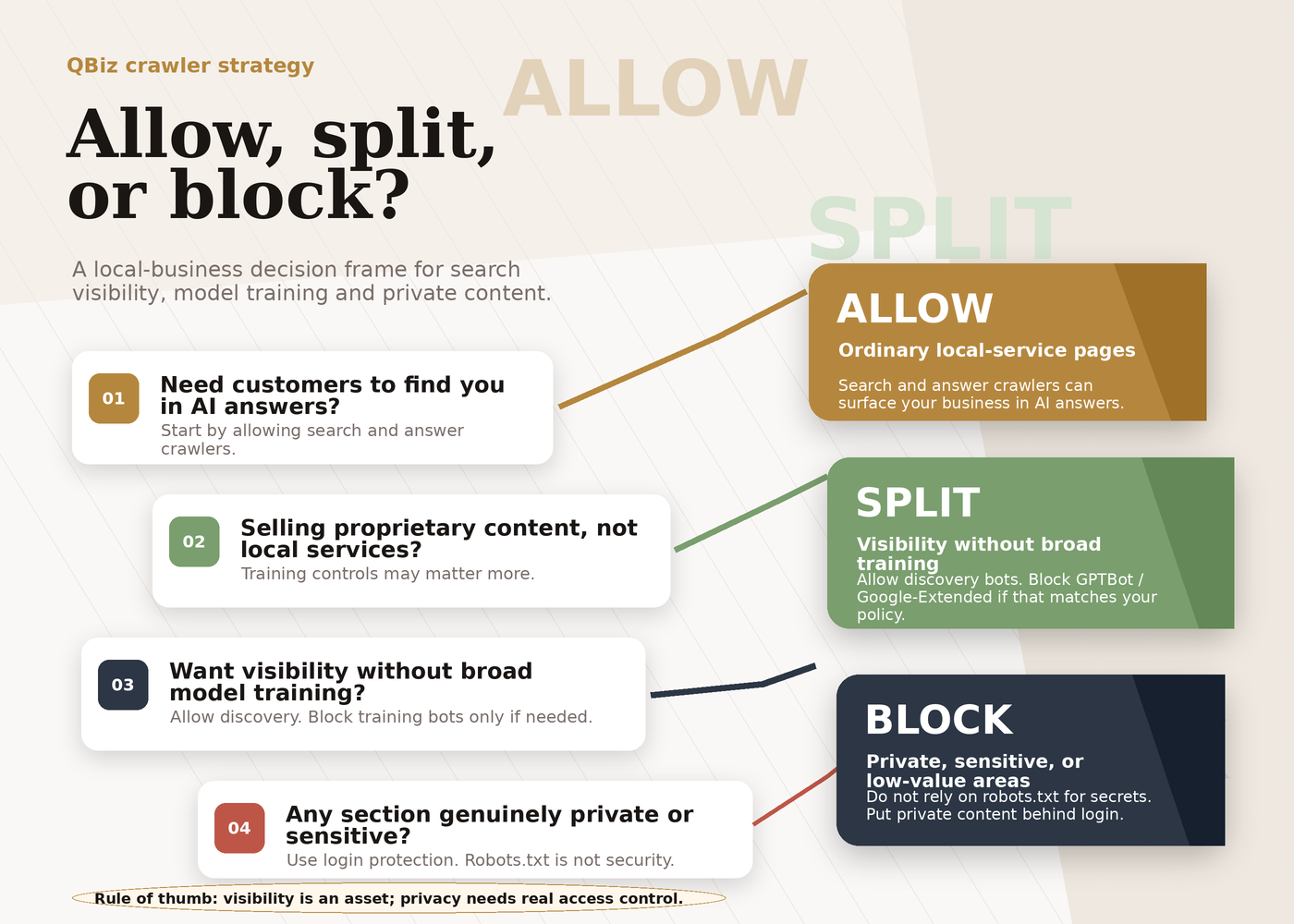
If you want to be found and recommended (most local businesses)
This is the default for a trade, a clinic, a law firm, an accountant, an estate agent, a salon, a garage, almost any business that sells to local customers and wants more of them. Allow the search and answer crawlers. Let OAI-SearchBot, PerplexityBot and Googlebot read your site so you can appear in the answers people are already asking for. There is no upside to blocking them and a clear downside. As more of these visitors become AI agents acting on a customer's behalf, the same logic extends to agent experience (AX): making your site easy for an agent to use, not just to read.
On the training crawlers (GPTBot, Google-Extended), you have a free choice that costs you no visibility either way. Many local businesses simply allow everything for simplicity. Some prefer to opt out of training on principle. Both are defensible. Neither will change whether a customer finds you tomorrow.
If you are protecting paid or original content (publishers)
If your website is the product (a paywalled archive, a stock library, a research database, a large body of original journalism or photography), the calculation flips. Here, blocking or restricting the crawlers, or using a paid-access arrangement of the kind Cloudflare is building, can make sense. But this is a small minority of business websites, and if it were you, you would already know it.
The split approach: welcome search, refuse training
The most considered position, and the one we would suggest a cautious owner take, is to separate the two. Allow the crawlers that put you in front of customers. Opt out of the ones that only train models. This keeps you fully visible in AI search and answers while declining to hand your content over for model training. Because the AI companies have made these settings independent, this is straightforward to set up, and it is the configuration in the example below.
How to check who is already visiting your site
Before you change anything, it is worth seeing what is actually happening. The AI bots announce themselves in your server logs every time they visit, and you can read that record.
Where to look. Every visit to your website is recorded with a "user agent", a short text label the visitor sends. Human browsers send one; so do bots. You can find these in:
- Your hosting control panel's raw access logs (cPanel, Plesk and most managed hosts expose these, sometimes labelled "raw log files" or "access logs").
- A server-log analytics tool if your developer has one set up (for example AWStats, GoAccess, or your CDN's bot analytics dashboard).
- Cloudflare or another CDN dashboard, if your site sits behind one: these increasingly show AI bot traffic as its own category.
Note that standard Google Analytics will not help here, because it relies on JavaScript that most crawlers do not run. You need the server-side log, not the analytics tag.
What to search for. Open the log and search for the user-agent tokens. These are the names the main AI bots travel under:
OAI-SearchBotandGPTBotandChatGPT-User(OpenAI)PerplexityBotandPerplexity-User(Perplexity)Google-Extendedwill not appear as a separate visitor in logs, because it is a training-permission token rather than a distinct crawler, butGooglebotwill.
If you see GPTBot and OAI-SearchBot in your logs, OpenAI's systems are reading your site, which is what you want if you would like to appear in ChatGPT. If you see nothing AI-related at all, it is worth checking that you are not blocking them by accident (an over-zealous security plugin or a restrictive robots.txt can do this silently).
How to set your robots.txt (with examples)
The control for all of this is a small text file called robots.txt that lives at the root of your website (yourdomain.co.uk/robots.txt). It is a set of polite instructions: the reputable AI crawlers above all state that they read and obey it for automatic crawling. Your web person can edit it in a couple of minutes.
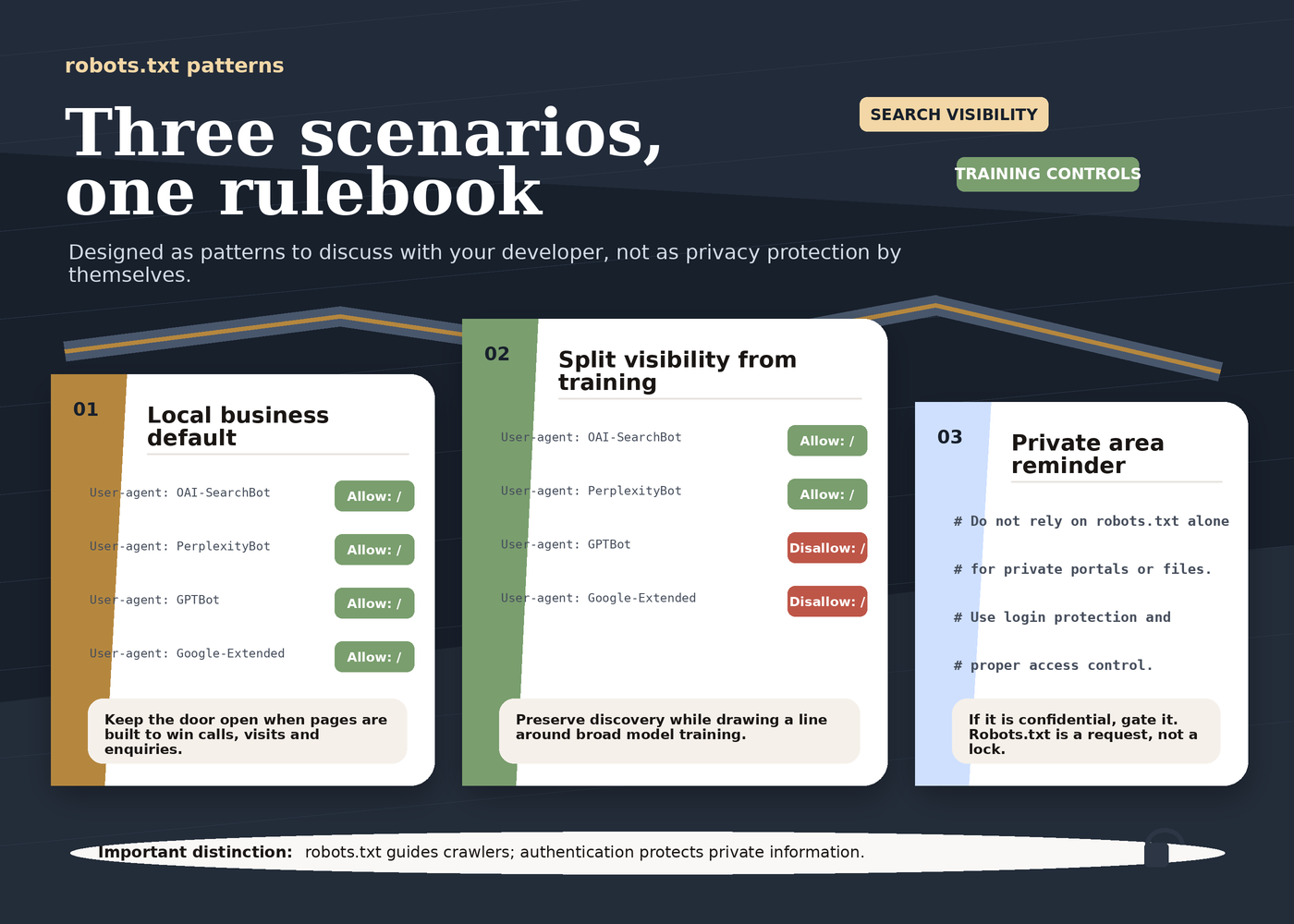
A short reminder on how it reads: a Disallow: / line under a bot's name tells that bot to stay out of the whole site. Leaving a bot unmentioned, or giving it Allow: /, lets it in.
The setup
Setting your robots.txt, step by step
Check who visits
Read your server access logs for GPTBot, OAI-SearchBot and PerplexityBot; analytics will not show them.
Choose allow or split
Stay fully open, or welcome the search crawlers while opting out of the training ones.
Edit robots.txt
Allow OAI-SearchBot and PerplexityBot; add a Disallow for GPTBot and Google-Extended if you decline training.
Give it a day
Both OpenAI and Perplexity note it can take around 24 hours for a change to be reflected.
Option A: stay fully open (simplest, good default for most local businesses). Do nothing special. As long as your robots.txt does not disallow these bots, they are allowed. If you want to be explicit and reassuring to whoever reads the file later:
# Allow AI search and answer engines to find us
User-agent: OAI-SearchBot
Allow: /

User-agent: PerplexityBot
Allow: /
Option B: the split (welcome search, opt out of training). This keeps you fully visible in ChatGPT, Perplexity and Google while declining model training:
# Welcome the crawlers that put us in AI answers
User-agent: OAI-SearchBot
Allow: /

User-agent: PerplexityBot
Allow: /

# Opt out of AI model training
User-agent: GPTBot
Disallow: /

User-agent: Google-Extended
Disallow: /
Option C: block AI broadly (only if you have a publisher-style reason). Add Disallow: / for each AI bot you want to exclude. Be aware that disallowing OAI-SearchBot or PerplexityBot removes you from those engines' answers. We would not recommend this for a business that wants customers.
Two cautions. First, changes are not instant: both OpenAI and Perplexity note it can take around 24 hours for a robots.txt change to be reflected in their systems (OpenAI; Perplexity). Second, robots.txt is a set of instructions that well-behaved bots follow; it is not a security wall. If you genuinely need to stop access (for a private area, say), that is a job for proper authentication, not robots.txt.
Common mistakes
Avoid these
Where the crawler decision goes wrong
Do not block AI because a headline said to.That advice is written for publishers protecting paid content; on a local site it removes you from AI search for no benefit.
Do not treat all bots as one thing.A blanket "AI crawlers" block sweeps up the search crawlers that get you recommended along with the training ones.
Do not assume a blocked training bot hurts visibility.Opting out of GPTBot or Google-Extended does not remove you from ChatGPT search or Google's results.
Do not let a security plugin block bots silently.Some firewalls block unfamiliar user agents by default; check yours is not excluding OAI-SearchBot or PerplexityBot.
Do not check the wrong report.Standard Google Analytics will not show AI crawlers; use your server access logs, and give a robots.txt change about a day.
- Blocking AI because a headline said to. The "block the bots" advice is written for publishers protecting paid content. Copying it onto a local business site quietly removes you from AI search for no benefit.
- Treating all bots as one thing. Disallowing "AI crawlers" as a blanket category sweeps up the search crawlers that get you recommended along with the training crawlers. Separate them.
- Assuming a blocked training bot hurts your visibility. Opting out of GPTBot or Google-Extended does not remove you from ChatGPT search or Google's results. It only declines model training.
- Letting a security plugin block bots silently. Some firewall and security plugins block unfamiliar user agents by default. Check that yours is not quietly excluding OAI-SearchBot or PerplexityBot.
- Checking the wrong report. Standard Google Analytics will not show AI crawlers, because they do not run its JavaScript. Use your server access logs instead.
- Expecting instant results. After editing
robots.txt, give it about a day before judging whether anything changed.
Frequently asked questions
Should I block AI crawlers?
For most local and small businesses, no. The crawlers that matter for being found (OpenAI's OAI-SearchBot, Perplexity's PerplexityBot, Google's Googlebot) are how you appear in AI answers and search. Blocking them removes you from those results without protecting anything. Blocking is mainly sensible for publishers whose paid or original content is the product. If you are unsure, the safe middle path is to allow the search crawlers and opt out only of model-training crawlers.
What is GPTBot and should I allow it in robots.txt?
GPTBot is OpenAI's crawler for collecting content that "may be used in training our generative AI foundation models" (OpenAI)[1]. Allowing or blocking it is a choice about whether your content helps train OpenAI's models. It is separate from appearing in ChatGPT search, which is controlled by OAI-SearchBot. Blocking GPTBot will not make you invisible in ChatGPT; it only opts you out of training.
If I block GPTBot, will I disappear from ChatGPT?
No. Appearing in ChatGPT's search answers is governed by OAI-SearchBot, a different bot. You can disallow GPTBot (training) while allowing OAI-SearchBot (search) so you stay visible. OpenAI confirms these settings are independent of each other.
What about Google? Will blocking AI affect my Google ranking?
Google uses a separate control called Google-Extended for AI model training. As Google's crawler documentation puts it, "Google-Extended does not impact a site's inclusion in Google Search nor is it used as a ranking signal in Google Search", because it is independent of Googlebot (Google, Google crawlers and fetchers)[4]. You can decline AI training and keep your normal Search presence.
How do I know if AI bots are already crawling my site?
Check your server access logs (through your hosting control panel or a log-analytics tool) and search for user agents such as GPTBot, OAI-SearchBot and PerplexityBot. If they appear, those companies are reading your site. Ordinary Google Analytics will not show them, because crawlers do not run its JavaScript.
Can I stop an AI from reading my page if a user asks it to?
Not reliably. User-initiated fetchers such as OpenAI's ChatGPT-User act on a real person's request, and OpenAI notes that for these, "robots.txt rules may not apply" (OpenAI)[1]. This is usually fine: someone who has pointed an AI at your page is a potential customer.
Is robots.txt enough to keep bots out completely?
No. It is a set of instructions that reputable bots follow, not a security barrier. Well-behaved crawlers obey it; it cannot force compliance. For anything genuinely private, use proper login protection rather than relying on robots.txt.
Where to start
If you run a business that wants more local customers, the action today is short: make sure you are not accidentally blocking the crawlers that get you recommended. Ask whoever maintains your site to open your robots.txt (and your security plugin settings) and confirm OAI-SearchBot, PerplexityBot and Googlebot are not disallowed. If you also want to opt out of model training on principle, add the GPTBot and Google-Extended Disallow lines from Option B above. That is the whole job for most owners.
The bigger question sitting behind this one is not "should I block the bots?" but "when the bots read my site, do I actually show up in the answers?" Being crawlable is the floor, not the ceiling: it lets the rest of your work count, but being recommended still depends on reviews, a complete Google Business Profile, clear content and a consistent presence across the web. That is the subject of our local AEO pillar guide, and if your site is built in a way AI cannot read at all, start with the JavaScript visibility check first.
If you would rather have someone check the whole picture for you, whether the AI engines can read your site, whether they are visiting, and whether you appear in the answers your customers are asking, that is what a QBiz AI Visibility audit does. We check how each major AI engine reads your site, pinpoint the answers where your business shows up and the ones where it is missing, and give you a prioritised list of fixes to close the gap. It is the sensible place to start before you change a single setting.
Get your AI Visibility audit →
Sources
- [1] OpenAI, "Overview of OpenAI Crawlers": https://developers.openai.com/api/docs/bots (primary; verified this session. OAI-SearchBot surfaces sites in ChatGPT search and sites opted out "will not be shown in ChatGPT search answers"; GPTBot crawls content that "may be used in training our generative AI foundation models"; ChatGPT-User is user-initiated and "robots.txt rules may not apply"; "each setting is independent of the others" so a site can allow OAI-SearchBot while disallowing GPTBot; ~24 hours for a robots.txt change to take effect.)
- [2] Perplexity, "Perplexity Crawlers": https://docs.perplexity.ai/guides/bots (primary; verified this session. PerplexityBot "is designed to surface and link websites in search results on Perplexity. It is not used to crawl content for AI foundation models" and is recommended for allowing; Perplexity-User is user-initiated; up to 24 hours to reflect robots.txt changes.)
- [3] Google, "An update on web publisher controls" (Google-Extended), 28 Sep 2023: https://blog.google/innovation-and-ai/products/an-update-on-web-publisher-controls/ (primary; verified this session. Google-Extended lets publishers "manage whether their sites help improve" Google's generative AI models via robots.txt; it is independent of Googlebot, so opting out does not affect Search inclusion or ranking.)
- [4] Google, "Google crawlers and fetchers (user agents)": https://developers.google.com/crawling/docs/crawlers-fetchers/google-common-crawlers (primary; carries the verbatim Google-Extended line quoted in FAQ #4: "Google-Extended does not impact a site's inclusion in Google Search nor is it used as a ranking signal in Google Search".)
- [5] Cloudflare, "Content Independence Day: no AI crawl without compensation!", 1 Jul 2025: https://blog.cloudflare.com/content-independence-day-no-ai-crawl-without-compensation/ (primary; verified this session. Cloudflare changed its default to "block AI crawlers unless they pay creators for their content"; states that getting traffic from AI is "750 times more difficult" with OpenAI and "30,000 times more difficult" with Anthropic than with the Google of old. Context: this is aimed at content publishers, framed here as the trend a local business should weigh against its own discovery needs.)
- [6] BrightLocal, Local Consumer Review Survey 2026: https://www.brightlocal.com/research/local-consumer-review-survey/ (independent; prior-verified. Consumers using AI for local recommendations rose from 6% to 45%, the third most popular source; 40% trust AI tools to recommend businesses. Supports the case that local businesses want to remain crawlable.)
Leave a comment
Thoughts on this post? Leave a comment below. Comments are moderated before they appear, so yours will not show on the page straight away.
Your email is used only to contact you about your comment if needed — it is never published.
Comments
No comments yet. Be the first to leave one above.