Structured Data Testing Tools for Law Firm Websites: Setup and Validation Guide
Legal
Same report, two verdicts
Summary
A law firm's structured data can look correct in the page source and still fail every test that matters. Two free tools check it properly: Google's Rich Results Test and the Schema Markup Validator. Run your URL or code through both. The Rich Results Test tells you whether Google can use the markup for a rich result and flags critical errors against non-critical warnings. The Schema Markup Validator extracts the markup, shows the structured data graph it found, and identifies syntax mistakes against schema.org itself. For a law firm, the types worth checking are LegalService (not the deprecated Attorney type), LocalBusiness properties, FAQPage, and Review or AggregateRating, each with its own rule for what counts as valid.
Short version
Clean, parseable structured data does not move your Google ranking on its own. Google states plainly that a structured data problem affects rich-result eligibility, not ranking. What it does do is give AI systems and search engines an unambiguous set of facts about your firm, which is one of the concrete mechanisms behind getting identified and cited correctly by AI search tools. Test with both validators, fix every critical error, and treat clean markup as the floor, not the finish line.
A law firm's schema can pass a casual glance at the page source and still be worthless to Google. The markup might reference a field that no longer exists on the page. It might sit in a block of JSON with one missing comma, which breaks the whole object rather than just one line. It might describe a FAQ section that was removed from the page six months ago. None of these show up by eye. All of them show up the moment you run the right tool.
This guide walks through how to actually test structured data on a law firm website: which tools to use, which schema types matter for a legal practice, the errors that quietly break markup, and what a clean result does and does not get you.
Which tool actually tests structured data?
Two free tools cover this job, and they check different things, so use both rather than picking one.
| Tool | What it checks | Best for |
|---|---|---|
| Rich Results Test (Google) | Whether a page's markup is eligible for a rich result in Google Search, flagging critical errors and non-critical issues separately | Confirming Google specifically can read and use your markup |
| Schema Markup Validator (schema.org) | Extracts JSON-LD, RDFa and Microdata, then "identifies syntax mistakes in the markup" against schema.org itself | Checking schema.org terms, including types Google does not use for rich results |
Google's introduction to structured data names the Rich Results Test as the standard validation step: "the Rich Results Test is an easy and useful tool for validating your structured data, and in some cases, previewing a feature in Google Search." The same page sets two checkpoints: the Rich Results Test "during development", and the Rich result status reports "after deployment", because a page can break once it is live through templating or serving changes.
The Rich Results Test accepts either a live URL or a pasted code snippet. A URL test shows you what Google's crawler actually sees on the rendered page, which catches a class of error a code paste cannot: markup injected by a template that never reaches the final HTML, or a JavaScript framework that renders the schema client-side in a way the crawler cannot see. Pasting code is faster for checking a block before it goes live, but it only proves the code itself is valid, not that it will reach Google in that form on the real page.
Choosing an input
What each input mode leaves unproven
What "pass" and "fail" actually mean
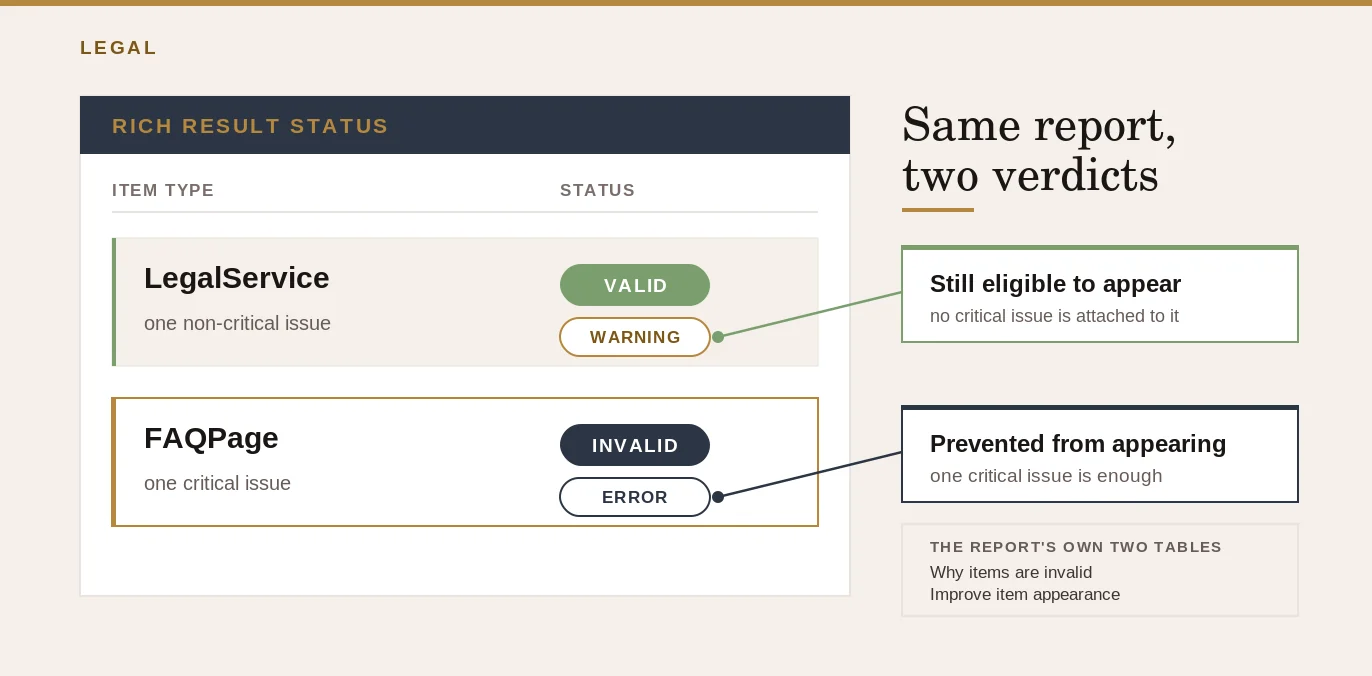
Google Search Console's rich result reports split every structured data item into two categories, and the distinction matters more than it sounds. "A valid item is an item that doesn't have any critical issues and can appear on Google as a rich result. An invalid item has at least one critical issue preventing it from appearing as a rich result."
Underneath that split sit two tables: critical issues that prevent your structured data from being used at all, and non-critical issues that Google separately describes as items to "improve item appearance." A critical issue is a stop. A non-critical issue is a quality note you can act on later without losing eligibility.
That distinction answers the question underneath it: does a warning in the Rich Results Test mean your schema is broken? No. If the tool shows the item as valid with warnings attached, Google can still use it. Fix the warnings when you have time; fix critical errors before you do anything else.
The five schema types worth checking for a law firm
Not every schema.org type applies to a legal practice, and using the wrong one is a precision problem even when the markup technically parses.
| Type | What it is for | What to watch for |
|---|---|---|
| LegalService | Identifies the firm itself: "a business that provides legally-oriented services, advice and representation, e.g. law firms," per schema.org's own definition | Use this, not Attorney, for the firm's primary identity block |
| Attorney | A narrower historical type for an individual lawyer | The schema.org entry for Attorney says: "This type is deprecated - LegalService is more inclusive and less ambiguous." A site still running this type from an older build should move to LegalService |
| LocalBusiness properties | Address, phone, opening hours, geo and area served, which LegalService carries | Check these resolve to real, current values, not a developer's placeholder address left over from a staging build |
| FAQPage | Marks up a visible question-and-answer block on the page | Must describe content a visitor can actually read on the page; see the implementation errors below |
| Review / AggregateRating | A star rating or written review | Only valid for rich-result eligibility on a site that captures reviews about OTHER businesses, not your own. A law firm cannot mark up its own star rating this way and expect it to be eligible |
The Attorney-to-LegalService correction is a one-value fix: change the "@type" field in the relevant JSON-LD block, not a redesign. Do it because schema.org itself deprecates the type, and because Google's guidance is to "use the most specific applicable type."
The Review/AggregateRating rule is worth singling out, because it looks like the obvious thing to do: you have real five-star reviews, so why not mark them up? Google's structured data documentation for review snippets answers this directly, scoping the Local Business review property to "only for sites that capture reviews about other local businesses." A law firm's own site, marking up its own rating, falls outside that scope regardless of how genuine the reviews are. The reviews themselves can and should appear in ordinary page text.
Schema.org type choice
Where a firm starts depends on what it already declares
Common implementation errors that make schema invisible to parsers
Broken structured data can look completely fine to a human reading the HTML. Google Search Console's own error taxonomy for unparsable structured data names the exact failure classes. Its error-type table states each as a name and a description:
- "Invalid JSON document" / "The JSON had a top-level syntax error."
- "Parsing error: Missing ',' or '}'" / "Missing a comma or closing brace."
- "Bad escape sequence in string" / "An invalid escape sequence used in a string value."
Google notes that "the most common cause of a single error affecting multiple pages is an underlying template error," which is exactly why one missing comma in a site-wide template can quietly break the schema on every page that uses it.
Unparsable data report
Reading the three error names as questions
A second class of error is not a syntax problem at all: it is a content-matching problem. Google's own structured data guidelines state the rule directly: "Don't mark up content that is not visible to readers of the page." A FAQPage block that references questions no longer shown on the page, or a LegalService block that still lists a practice area the firm dropped two years ago, will still parse as syntactically valid JSON. The syntax is fine. It is also describing something that is not there, which is a guideline violation that a syntax checker alone will not catch. Fixing this means reading the live page next to the live markup, not just running the markup through a validator in isolation.
Where the tools stop
Two failures a parser cannot see
A third, quieter version of the same problem is markup that never reaches the page at all. Some content management systems and JavaScript frameworks render structured data client-side, after the initial page load. If the Rich Results Test is run on a pasted code snippet rather than the live URL, this failure mode is invisible: the snippet validates perfectly, because the snippet is correct. The live page, as Google's crawler actually receives it, may never render that script tag. This is the specific reason to test the live URL, not just the code you intend to publish.
A working example: LegalService JSON-LD
Here is a minimal, correctly typed LegalService block for a law firm's homepage, using the properties inherited from LocalBusiness:
Paste this into the Schema Markup Validator first to confirm it parses against schema.org, then run the live page URL through the Rich Results Test to confirm Google's crawler receives it unchanged.
Why this is necessary, and why it is not the whole job
Everything above answers one question: is your structured data technically correct? That question matters, and most of this guide has been about answering it properly rather than glancing at a page source and assuming it is fine.
But technically valid, parseable structured data is necessary and not sufficient. Google's own guidance on AI features in Search lists structured data as one item on a list of existing SEO fundamentals it says still apply to AI Overviews and AI Mode, alongside crawlability, internal linking and having important content available in textual form: "making sure your structured data matches the visible text on the page." It is named as groundwork, not as a lever that moves a ranking or an AI citation on its own. A structured data manual action "doesn't affect how the page ranks in Google web search"; it only removes eligibility for a rich result.
What clean, matching structured data actually does is give an AI system or search engine an unambiguous set of facts: this is the firm's name, this is its practice area, this is its address and phone number. That is one of the concrete mechanisms behind getting correctly identified and cited by AI search tools, because an engine assembling an answer has to extract facts about your firm from somewhere, and clean structured data is a cleaner source than parsing prose and hoping the inference is right.
Whether that clarity shows up in how a firm actually ranks is a separate measurement, and QBiz put numbers on it in Structured Data Markup vs. On-Page SEO for Law Firms. The broader mechanics of how a page earns an AI citation once it is technically sound, covering ranking overlap, freshness and extractable formatting, are in How to Get Cited in Google AI Overviews.
Frequently asked questions
Does the Rich Results Test check whether my schema improves my Google ranking?
No. The Rich Results Test checks eligibility for rich-result display, not ranking. Google's own structured data guidelines state that a structured data manual action "doesn't affect how the page ranks in Google web search," it only removes rich-result eligibility. Ranking and schema validity are separate questions.
What is the difference between the Rich Results Test and the Schema Markup Validator?
The Rich Results Test checks specifically whether Google can use your markup for a rich result in Google Search, splitting results into critical errors and non-critical issues. The Schema Markup Validator extracts the markup and identifies syntax mistakes against schema.org itself, including types Google does not use for rich results at all. Running both catches different problems.
Should a law firm use the Attorney or LegalService schema type?
LegalService. Schema.org's own page for the Attorney type states directly that it "is deprecated - LegalService is more inclusive and less ambiguous." LegalService also carries the LocalBusiness properties such as address, phone and opening hours, and Attorney defines no properties of its own on top of them.
Can a law firm mark up its own star rating with Review or AggregateRating schema?
Not for rich-result eligibility. Google's structured data guidelines scope the Local Business review property to sites that capture reviews about other local businesses, not a business reviewing itself. A firm's own five-star rating should appear as ordinary page text rather than as Review or AggregateRating structured data pointing at its own entity.
Why does my structured data still fail after the JSON looks correct to me?
Two common causes beyond pure syntax: the markup describes content that is no longer visible on the live page (Google's guidelines explicitly forbid this), or the markup is injected by JavaScript and never reaches the version of the page Google's crawler actually receives. Testing a pasted code snippet only checks the code; testing the live URL checks what Google actually sees.
Once your schema validates clean, check what it is actually doing for you
A clean pass on the Rich Results Test and the Schema Markup Validator means your structured data is technically sound. It does not tell you whether AI search tools can find your firm, describe it correctly, or cite it over a competitor's. Those are measured separately, and QBiz's AI-readiness check looks specifically at whether the technical signals on your site, including structured data, are actually giving AI systems a reason to name your firm. It takes about thirty seconds and tells you which of the key signals you are passing or failing right now.
Sources
- [1] Schema Markup Validator documentation, schema.org.
- [2] General Structured Data Guidelines, Google Search Central.
- [3] Intro to How Structured Data Markup Works, Google Search Central.
- [4] AI Features and Your Website, Google Search Central.
- [5] Rich Result Report Overview, Google Search Console Help.
- [6] Unparsable Structured Data Report, Google Search Console Help.
- [7] Review Snippet (Review, AggregateRating) Structured Data, Google Search Central.
- [8] LegalService, schema.org.
- [9] Attorney, schema.org.
- [10] Structured Data Markup vs. On-Page SEO for Law Firms, QBiz Leads AI.
- [11] How to Get Cited in Google AI Overviews, QBiz Leads AI.
Leave a comment
Thoughts on this post? Leave a comment below. Comments are moderated before they appear, so yours will not show on the page straight away.
Your email is used only to contact you about your comment if needed; it is never published.
Comments
No comments yet. Be the first to leave one above.