What Is a Good AI Visibility Score? Published Ranges by Tool
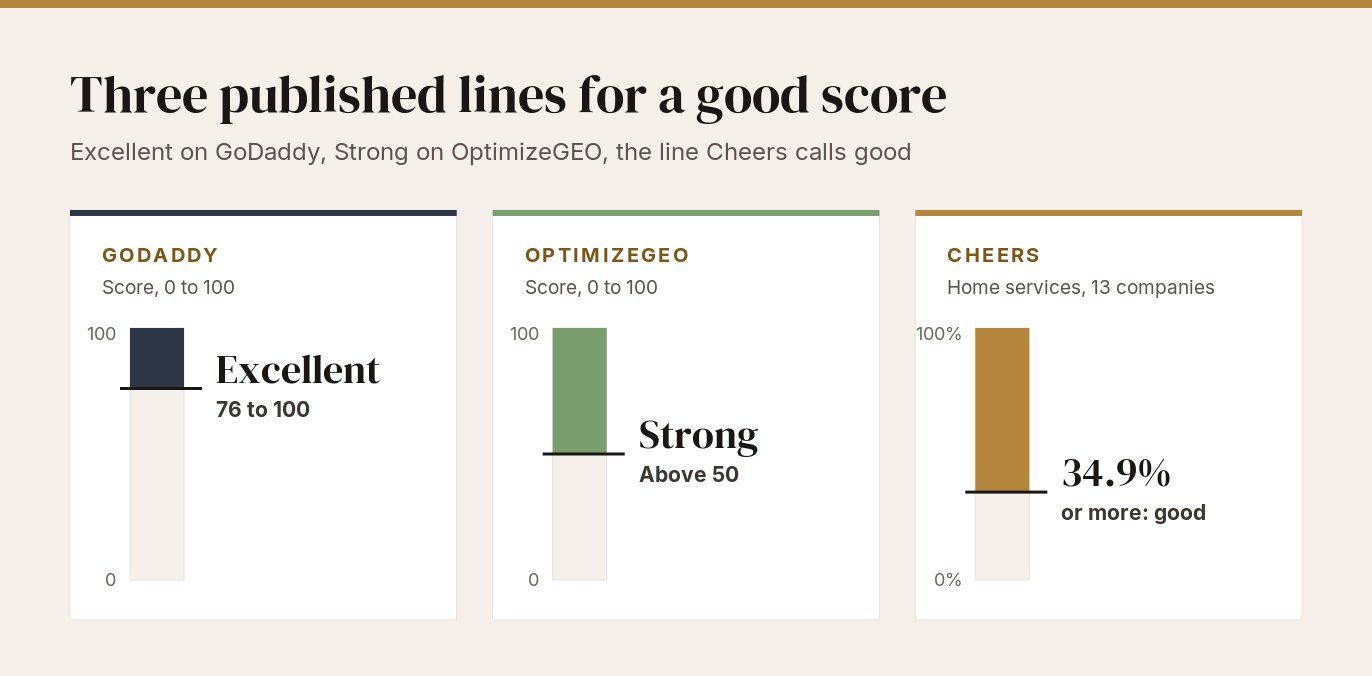
Short version: Semrush[1] bases its AI visibility score on how often a brand appears in AI answers relative to its industry peers. GoDaddy[2] bases its score on consistency across platforms and prompts, and Promptwatch[4] on prominence within each answer. Different tools use different criteria, so their numbers are not comparable.[4] Of the vendors that publish ranges, GoDaddy rates 76 to 100 excellent and OptimizeGEO[3] calls above 50 strong. Cheers[5] calls an appearance rate of 34.9% or more good, a line drawn from 13 home-services companies. The QBiz AI visibility checker scores each site as a share of the points it can award, and its median across 25 sampled UK and US sites was 78 out of 100. These numbers describe how those sites score under the checker’s criteria and are not a market benchmark. To judge your own result, run customer-style prompts for you and named competitors on the same engines, and repeat the identical setup when you re-measure.
What does each tool’s AI visibility score measure?
Five vendors document how their score is built, set side by side below. For the term itself, see What is AI visibility?
| Tool | What its score is built from | Range for a good overall score published? |
|---|---|---|
| Semrush[1] | A 0 to 100 metric for how often the brand appears in AI-generated answers compared with others in its industry, which Semrush describes as a baseline for tracking progress month over month. | No. |
| GoDaddy[2] | A 0 to 100 number based on how consistently the business shows up across platforms and prompts. Results split into Cited (the AI used the business as a direct source) and Mentioned (the AI named it without relying on it as a primary source). | Yes, four bands. |
| OptimizeGEO[3] | A 0 to 100 weighted composite of five components: citation frequency (30%), prompt coverage (20%), entity authority (20%), answer prominence (15%) and cross-platform consistency (15%). | Yes, three bands. |
| Promptwatch[4] | Each answer scores 1 to 100 on prominence, or 0 when the brand is not substantively mentioned. The headline number is the average across all answers, zeros included. | No. Its published bands place a single answer, not the overall score. |
| Cheers[5] | An appearance rate: the share of tracked AI answers that name the business. | Yes, three lines. |
Same ten answers, two numbers
Promptwatch publishes a worked example of ten answers. They are a sole recommendation (100), first in a ranked list (92), second place (72), third place (57), a brief passing mention (15), and five answers that earn 0. One of those five is the model saying it has no information about the brand, and one names the brand only in a cited source title. The total is 336, so the Promptwatch Visibility Score is 33.6.[4] Promptwatch says a string-matching tool would count the “no information” answer and the source-title answer as mentions.[4]
Counted that way, Promptwatch’s ten answers give the brand a mention rate of 70% (7 of 10), against a Promptwatch score of 33.6.
Promptwatch worked example
Where Promptwatch’s 33.6 comes from
What ranges do vendors publish for a good score?
Three of the five vendors publish ranges for a good overall score: GoDaddy, OptimizeGEO and Cheers.
| Vendor | Published range | Vendor’s reading |
|---|---|---|
| GoDaddy[2] | 76 to 100 | Excellent: the business appears frequently across AI platforms. |
| GoDaddy[2] | 51 to 75 | High: appearing regularly, with room to improve. |
| GoDaddy[2] | 26 to 50 | Moderate: appearing occasionally, with significant opportunities to improve. |
| GoDaddy[2] | 0 to 25 | Low: rarely appearing in AI responses. |
| OptimizeGEO[3] | Above 50 | Strong. OptimizeGEO adds that category leaders rarely exceed 70. |
| OptimizeGEO[3] | 30 to 50 | Competitive in most moderate-competition categories. |
| OptimizeGEO[3] | Below 20 | Significant structural gaps in content, authority or technical accessibility. |
| Cheers[5] | 34.9% or higher | Top quarter of the 13 home-services companies Cheers tracked. Cheers calls this line good. |
| Cheers[5] | 29.5% | The median of the 13 companies, named in about three answers in ten. |
| Cheers[5] | Below 12.8% | Bottom quarter of the 13 companies: missing from about seven tracked answers in eight. |
GoDaddy says most small businesses start with a lower score because AI search is new, and calls the score a starting point.[2] Cheers drew its bands from 958,754 AI answers to prompts that do not name the business, tracked for 13 home-services companies over the 28 days ending 2 September 2026.[5] Cheers says a dentist or a law firm should not read the bands as their own, and calls 13 companies a small panel.[5]
How does one number read on two published scales?
GoDaddy and OptimizeGEO both publish bands on a 0 to 100 scale, so one number can be read against each.[2][3] OptimizeGEO publishes no band for 20 to 29, so the table skips that range.
| Score | GoDaddy | OptimizeGEO |
|---|---|---|
| 15 | Low (0 to 25) | Significant structural gaps (below 20) |
| 40 | Moderate (26 to 50) | Competitive (30 to 50) |
| 55 | High (51 to 75) | Strong (above 50) |
| 80 | Excellent (76 to 100) | Strong (above 50) |
GoDaddy and OptimizeGEO
Two vendors’ bands on one 0 to 100 axis
What does the QBiz AI visibility checker measure?
The QBiz AI visibility checker scores 14 items worth 103 points in total, from a site’s homepage plus its llms.txt, robots.txt and sitemap files. It runs on the AI Visibility Report page, where the widget carries the titles AI Optimization Checker and AI Optimization Score. Every item is all or nothing. The table gives each item’s points and the test the code applies. What an AI visibility checker actually measures sets out what a check of that kind covers.
| Item | Points | What passes |
|---|---|---|
| llms.txt file | 15 | A non-empty response at /llms.txt or /.well-known/llms.txt that does not open with <!doctype or <html. |
| Schema markup | 15 | The text “application/ld+json” or “schema.org” anywhere in the homepage HTML. |
| LocalBusiness schema | 5 | The word “LocalBusiness” anywhere in the HTML. |
| Organization schema | 5 | The word “Organization” anywhere in the HTML, matching case. |
| FAQ content | 10 | “faq” in any case anywhere in the HTML, or “FAQPage”, or both “Question” and “Answer”. |
| Meta description | 8 | A meta description longer than 50 characters. |
| Robots.txt | 8 | Fails if the file contains GPTBot or Claude-Web, or both “User-agent: *” and “Disallow: /”. Passes when the file cannot be read. |
| Heading hierarchy | 7 | Exactly one h1 element and at least one h2. |
| Title tag | 6 | A title of 21 to 69 characters. |
| XML sitemap | 6 | A sitemap named in robots.txt, or at /sitemap.xml, /sitemap_index.xml or /wp-sitemap.xml, whose body contains “<sitemap” or “<urlset”. |
| Image alt text | 5 | At least 70% of images carry alt text longer than 5 characters. |
| HTTPS/SSL | 5 | The URL as typed begins with https://. |
| Canonical tag | 4 | A link element with rel=“canonical”. |
| Contact information | 4 | An email address pattern, a 10-digit phone pattern, or the word “address” or “location” anywhere in the HTML. |
How the score is calculated
The score is the points awarded divided by the points available, multiplied by 100 and rounded. Available points are 103 when the checker detects schema markup and 93 when it does not, because the LocalBusiness and Organization items are scored only after schema markup is detected.
The widget then labels the result: Excellent! from 80, Good - Room for Improvement from 60, Needs Improvement from 40 and Critical - Immediate Action Needed below 40.
Edge cases in the checker’s rules
Most tests are string matches on the page’s HTML, so a result records what the checker detected.
- FAQ, schema, LocalBusiness, Organization and contact. A menu link or CSS class containing “faq” passes the FAQ item. The text “schema.org” alone passes schema markup. The UK spelling “Organisation” does not match “Organization”, and the word “location” anywhere in the HTML passes the contact item.
- Robots.txt. The browser can read the file only when the site sends CORS headers. On every other site the item passes by default. Where the file is read, any file containing the string GPTBot fails, whatever rule sits beside it.
- HTTPS/SSL. The item tests the URL as typed. No connection or certificate is checked.
- llms.txt. Any non-empty response that does not open with an HTML tag passes, so a plain-text error page can pass.
- Image alt text. A page with no images fails, because coverage is set to zero.
- Scope. The checker makes no AI queries. Beyond the homepage, it requests only llms.txt, robots.txt and a sitemap.
How did 25 sampled sites score under the QBiz AI visibility checker?
Of 30 UK and US firms sourced, the checker scored 25. On the other 5 it could not complete its fetches, which returned an access-denied response or a challenge page, so they carry no score. The 25 scored sites averaged 74.9 out of 100, with a median of 78, a lowest score of 41 and a highest of 95. The middle half of scores runs from 66 to 85, an interquartile range of 19. The robots.txt item, worth 8 points, passed by default on 24 of the 25 sites. Those default points sit inside every mean and median here.
The sample, the date and the limits are in the How we ran this box below.
| Score | Widget band | Sites |
|---|---|---|
| 90 to 100 | Excellent! | 3 |
| 80 to 89 | Excellent! | 8 |
| 70 to 79 | Good - Room for Improvement | 6 |
| 60 to 69 | Good - Room for Improvement | 6 |
| 50 to 59 | Needs Improvement | 1 |
| 40 to 49 | Needs Improvement | 1 |
| 0 to 39 | Critical - Immediate Action Needed | 0 |
By band, 11 sites (44%) reached the top band, 12 (48%) reached Good - Room for Improvement and 2 (8%) reached Needs Improvement. Of the 25 sites, 24 were scored out of 103 points and 1 out of 93.
QBiz AI visibility checker results
How the 25 scored sites spread across the checker bands
What the checker did not detect, and what each item is worth
| Item (points) | Sites where the checker did not detect it | Points withheld | Score gain if detected |
|---|---|---|---|
| llms.txt file (15) | 13 of 25 (52%) | 195 | 14 to 16 |
| FAQ content (10) | 15 of 25 (60%) | 150 | 9 to 10 |
| LocalBusiness schema (5) | 19 of 24 (79%), scored only where schema markup was detected | 95 | 4 to 5 |
| Organization schema (5) | 10 of the same 24 (42%) | 50 | 4 to 5 |
| Heading hierarchy (7) | 5 of 25 (20%) | 35 | 6 to 7 |
| Image alt text (5) | 7 of 25 (28%) | 35 | 5 |
| Title tag (6) | 5 of 25 (20%) | 30 | 5 to 6 |
| Meta description (8) | 2 of 25 (8%) | 16 | 7 to 8 |
| Schema markup (15) | 1 of 25 (4%) | 15 | 9 (second example below) |
| Canonical tag (4) | 2 of 25 (8%) | 8 | 3 to 4 |
| XML sitemap (6) | 1 of 25 (4%) | 6 | 5 |
| Robots.txt (8) | Not reported, see the robots.txt note above. | ||
| HTTPS/SSL (5) and contact information (4) | Detected on all 25 sites. | ||
The checker detected an llms.txt file on 12 of the 25 sites. On 11 of those the response had an HTTP 2xx status. On 1 the proxy delivered a 404 page as HTTP 200, which the checker’s rule accepts.
Every scored site
Each row is one scored site, listed from the highest score to the lowest, with no trade or country given. The last column lists the items the checker did not detect, and robots.txt appears only where the checker flagged the file.
| Site | Score | Points | Items the checker did not detect |
|---|---|---|---|
| Site 1 | 95 | 98 of 103 | LocalBusiness schema |
| Site 2 | 95 | 98 of 103 | LocalBusiness schema |
| Site 3 | 90 | 93 of 103 | FAQ content |
| Site 4 | 86 | 89 of 103 | title tag, robots.txt |
| Site 5 | 85 | 88 of 103 | LocalBusiness schema, FAQ content |
| Site 6 | 85 | 88 of 103 | LocalBusiness schema, FAQ content |
| Site 7 | 85 | 88 of 103 | LocalBusiness schema, Organization schema, image alt text |
| Site 8 | 83 | 85 of 103 | LocalBusiness schema, Organization schema, meta description |
| Site 9 | 82 | 84 of 103 | Organization schema, FAQ content, canonical tag |
| Site 10 | 81 | 83 of 103 | llms.txt, LocalBusiness schema |
| Site 11 | 81 | 83 of 103 | LocalBusiness schema, Organization schema, FAQ content |
| Site 12 | 78 | 80 of 103 | FAQ content, heading hierarchy, sitemap |
| Site 13 | 78 | 80 of 103 | Organization schema, heading hierarchy, title tag, image alt text |
| Site 14 | 76 | 78 of 103 | llms.txt, LocalBusiness schema, Organization schema |
| Site 15 | 71 | 73 of 103 | llms.txt, LocalBusiness schema, FAQ content |
| Site 16 | 71 | 73 of 103 | llms.txt, LocalBusiness schema, FAQ content |
| Site 17 | 71 | 73 of 103 | llms.txt, LocalBusiness schema, FAQ content |
| Site 18 | 66 | 68 of 103 | llms.txt, LocalBusiness schema, FAQ content, image alt text |
| Site 19 | 66 | 68 of 103 | llms.txt, LocalBusiness schema, FAQ content, image alt text |
| Site 20 | 66 | 68 of 103 | llms.txt, LocalBusiness schema, Organization schema, FAQ content |
| Site 21 | 64 | 66 of 103 | llms.txt, LocalBusiness schema, Organization schema, heading hierarchy, image alt text |
| Site 22 | 63 | 65 of 103 | llms.txt, LocalBusiness schema, Organization schema, heading hierarchy, title tag |
| Site 23 | 60 | 62 of 103 | llms.txt, LocalBusiness schema, FAQ content, title tag, image alt text |
| Site 24 | 53 | 49 of 93 | llms.txt, schema markup, FAQ content, canonical tag; LocalBusiness and Organization schema not scored |
| Site 25 | 41 | 42 of 103 | llms.txt, LocalBusiness schema, Organization schema, FAQ content, meta description, heading hierarchy, title tag, image alt text |
Source: QBiz AI visibility checker, 2 November 2026.
Which items cost the most points, and what would each fix add?
Leaving out robots.txt, the checker withheld 635 of the 2,365 points available across the 25 sites. The first three rows of the table above account for 440 of them.
On a site scored out of 103, an item worth p points adds p ÷ 103 × 100 to the score before rounding. That is 14.6 for llms.txt, 9.7 for FAQ content and 4.9 for LocalBusiness schema. Two sites sat at the median, each with 80 of 103 points, which is 77.7 and shows as 78. On the one where the checker did not detect FAQ content, a pass on that item would give 90 of 103, which is 87.4 and shows as 87.
Three scored sites, worked through
A US roofing contractor scored 41 (Needs Improvement) with 42 of 103 points. The checker detected schema markup through the string “schema.org”, plus a sitemap, HTTPS, a canonical tag and contact details, and the robots.txt item passed by default. It did not detect llms.txt, LocalBusiness or Organization schema, FAQ content or a meta description. It also did not detect a heading hierarchy of exactly one h1 (it counted more than one), a title in range or enough alt text. Detecting one item at a time gives llms.txt 55 (+14), FAQ content 50 (+9), a meta description 49 (+8), headings 48 (+7) and a title 47 (+6).
A UK plumbing business scored 53 (Needs Improvement) with 49 of 93 points. The checker detected no schema markup. It also did not detect llms.txt, FAQ content or a canonical tag. Detecting llms.txt adds 16 (64 of 93 is 69), more than the 14.6 it adds on a 103 base. Detecting schema markup alone adds 9, from 53 to 62 (64 of 103), because the available points rise to 103. If LocalBusiness and Organization also matched, the score would reach 72 (74 of 103).
A second US roofing contractor scored 86 (top band) with 89 of 103 points, and the checker detected 12 of the 14 items. It did not detect a title in range, and the robots.txt item failed. Detecting the title adds 6 (92) and the robots item adds 8 (94).
Did two sampled businesses appear in AI answers to customer-style prompts?
On 2 November 2026, two businesses from the sample, a US roofing contractor and a UK plumbing business, were put through an AI-answer probe. The 24 answers to prompts that contained the business name all named it. None of the 48 answers to customer-style prompts did. The prompts ran on ChatGPT, Perplexity and Google AI Mode.
| Prompt type | Wording used (generic form) | Answers | Business named |
|---|---|---|---|
| Names the business | “Is [business name] a good choice for [job] in [town]?” and “What do you know about [business name] in [town]? Are they reputable?” | 24 | 24 of 24 |
| Customer-style | “Who are the best [trade] in [town]?”, “I need [a job] in [town]. Which local [trade] should I call?”, “Recommend a [trade] for [specific job] in [town].” and “Which [trade] firms in [town] have the best reviews?” | 48 | 0 of 48 |
AI-answer probe, DataForSEO API
Named in the answer, by prompt, engine and run
Every named or not-named result was identical across the two runs of each prompt. In 21 of the 24 answers to prompts that contained its name, the business’s own website appeared in the links or sources; the other 3, all from Google AI Mode, cited only listings such as Google, Yell or BBB. Every customer-style answer named other businesses, and the names changed between runs. Neither website appeared in any link, citation or source list in those answers.
The probe covers 2 businesses, 1 date and English-language prompts, so it illustrates two cases and gives no rate. The results are DataForSEO API responses, not screenshots of the consumer apps. Perplexity and Google AI Mode were set to country level, with the town written into each prompt.
- Date. 2 November 2026.
- Sample. 30 UK and US firms, 15 from each country, five each in dental, accountancy, roofing, plumbing, HVAC and law. The checker scored 25 and could not complete its fetches on the other 5.
- Selection. The first qualifying organic Google result for each of 30 trade-and-city queries, chosen before any site was measured. Chains, franchises and directories were excluded, judged from the result title and URL, and so were QBiz clients and QBiz leads.
- Tool. The QBiz AI visibility checker widget on the AI Visibility Report page (js/ai-widget.js, md5 d6c145a43f44a5e9588930fbceabad78), run unmodified in headless Chromium.
- Fetching. The widget reads a site directly when the site sends CORS headers and through a third-party proxy otherwise. 24 of the 25 scored sites needed the proxy path. Our runner fetched each site one request at a time, at least 2 seconds apart, and gave the widget the response a working proxy returns. A visitor’s own run goes through the live proxy and can differ when a proxy is unavailable.
- Tested. The homepage, llms.txt, robots.txt and a sitemap.
- Not measured. Whether any AI engine mentions, cites or recommends the other 23 scored sites.
- AI-answer probe. Two of the scored businesses, a US roofing contractor and a UK plumbing business, each received 6 prompts twice, 4 customer-style and 2 naming the business. The engines were ChatGPT (gpt-5.5, web search on), Perplexity (sonar-pro, web search on) and Google AI Mode, called through the DataForSEO API on 2 November 2026. That gives 72 answers, matched to the business name and domain by pattern.
- Limits. Three to five scored sites per trade, so no comparison between trades is made. The sample is the top qualifying result per query, not a random draw, and the 5 unscored sites are absent from every figure. Domains are withheld.
How do you judge whether your own score is good?
Promptwatch publishes this test: a good score beats your closest competitors on your own prompt set and keeps rising over several weeks.[4] Four checks make that workable.
Compare against competitors on the same prompts
Pick 3 to 5 businesses a customer would weigh against you, the group OptimizeGEO uses as its yardstick.[3] Run your prompt list for all of them in the same session on the same engines. How to Measure Your Brand's Share of Voice in AI Answers covers building that comparison.
Score only prompts a real customer would ask
Prompts that contain your own name inflate the result. Cheers gives the example “would you hire [your company] for a sewer backup?”, a question that returns the company almost every time.[5] Three of the 13 companies in the Cheers panel track prompts like that. Left in, they would lift the panel mean from 25.2% to 27.9% and the bottom-quarter line from 12.8% to 22.7%.[5] If your tracker mixes name-containing prompts into the headline number, strip them before you compare against any published range.
Cheers panel, 13 companies
Name-containing prompts and the Cheers panel lines
Split the result by engine
The same 13 Cheers companies had a median appearance rate of 36.0% on Google AI Mode, 24.1% on ChatGPT, 21.3% on Gemini and 13.9% on Perplexity. The best and worst engine sit 22.1 points apart.[5] A blended number can land anywhere in that spread depending on which engines the tool queries and how it weights them. Record each engine on its own line, and treat a combined figure as a summary of those lines.
Cheers panel by engine
Median appearance rate by engine
Check what the tool counts as a hit
Ask whether the tool separates being cited from being named. GoDaddy reports both,[2] and Promptwatch gives zero to an answer that names the brand without telling the reader anything about it.[4] What Does AI Visibility Mean for a Brand? covers why being named and being described well are separate outcomes.
How do you set a baseline and re-measure it?
A baseline is a dated record of answer counts beside the tool’s score, which you re-run on an unchanged setup. Five steps:
- Write the prompt list from real customer questions, leaving out prompts that name your business. How to Check If AI Recommends Your Business: Free Methods First walks through running these by hand and includes a tracking sheet.
- Fix the engines and record the result per engine as well as combined.
- Fix the competitors you chose for the comparison above.
- Record counts and score together: answers naming you out of answers checked, the tool’s name, the tool’s score and the date. A published rate converts to a target in answers: for a home-services business, Cheers’ 34.9% line on a 20-prompt list is 7 answers (34.9% of 20 is 6.98).[5]
- Repeat the same setup at a fixed interval. Change one variable at a time.
The same prompt can name you in one run and miss you in the next. AI Visibility Analytics: What You Can Actually Measure (and What You Can't) explains why, and what repeated sampling can and cannot show. If you are choosing software to run the prompts for you, Best AI Visibility Tools and Trackers for Small and Local Businesses compares seven.
Frequently asked questions
Is 50 a good AI visibility score?
On GoDaddy, 50 is the top of the moderate band (26 to 50), which GoDaddy describes as appearing occasionally.[2] On OptimizeGEO, 50 sits at the top of the competitive band (30 to 50), and anything above 50 is strong.[3] The Semrush checker page and the Promptwatch guide cited here publish no range for a good overall score.[1][4]
What is a good AI mention rate for a home-services business?
Cheers calls this measure an appearance rate. Across its 13 home-services companies, the median company was named in 29.5% of answers and 34.9% marked the top quarter, which Cheers calls good.[5]
Should prompts that contain my business name count toward my score?
No. Cheers found that such a prompt returns the business almost every time, so it tests recall of a name you supplied rather than a recommendation.[5] Track those prompts as a separate list.
How often should I re-measure my score?
Semrush describes its score as a month-over-month baseline,[1] and Promptwatch looks for a rise across several weeks.[4] Whichever interval you choose, keep it identical between runs.
Can a free tool give me a score to start from?
Semrush’s free AI Visibility Checker reports an AI Visibility Score for a domain, alongside the total number of brand mentions in AI answers.[1]
Is an AI visibility score the same as an SEO visibility score?
No. Cheers notes that Semrush’s Visibility % is based on click-through rate and a website’s progress in Google’s top 100 for tracked keywords.[5] SISTRIX, Cheers adds, weights each ranking by keyword search volume and expected click-through rate.[5] Semrush, Cheers and Promptwatch score AI answers instead: how often a brand appears, the share of answers that name it, and how prominently it features.[1][4][5]
What score should you aim for?
On GoDaddy’s scale, 76 or more is its Excellent band.[2] On OptimizeGEO’s, above 50 is strong.[3] A home-services business named in 34.9% or more of tracked answers clears the line Cheers calls good.[5] Past the bands, the number to beat is your closest competitor’s, measured on the same prompts and engines.[4]
A baseline counts the answers that name you. The QBiz AI visibility checker scores your website instead, and the form behind the button below leads to the page where it runs.
Run the QBiz AI visibility checker on your site →
Sources
- [1] Semrush, "Free AI Visibility Tool: Check Brand Visibility in AI Search": https://www.semrush.com/free-tools/ai-search-visibility-checker/
- [2] GoDaddy Help, "What is GoDaddy's AI Visibility tool?": https://www.godaddy.com/help/what-is-godaddys-ai-visibility-tool-42888
- [3] OptimizeGEO, "What Is AI Visibility Score and How to Improve It for Your Brand in 2026?": https://www.optimizegeo.ai/blog/ai-visibility-score
- [4] Promptwatch, "What Is an AI Visibility Score? How It's Calculated and What Counts as Good": https://promptwatch.com/blog/ai-visibility-score
- [5] Cheers, "AI Visibility Score: What's Good? 2026 Benchmarks": https://www.cheers.tech/geo-academy/what-is-a-good-ai-visibility-score
Leave a comment
Thoughts on this post? Leave a comment below. Comments are moderated before they appear, so yours will not show on the page straight away.
Your email is used only to contact you about your comment if needed, and it is never published.
Comments
No comments yet. Be the first to leave one above.